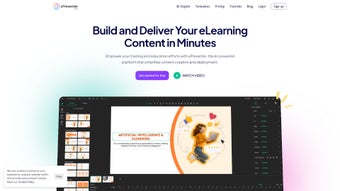

uPresenter'ı İndir – AI Destekli Sunum ve Quiz Oluşturma Aracı Windows, Mac, iOS ve Android için
Fikirlerinizi çarpıcı, etkileşimli sunumlar ve quiz'lere dönüştürün uPresenter ile, AI destekli içerik üretimini profesyonel tasarım araçlarıyla birleştiren akıllı yazılım. İster eğitimci, kurumsal eğitmen, ister içerik üreticisi olun, uPresenter tüm sunum yaşam döngüsünü basitleştirir—konu girişinden son teslimata kadar. Otomatik biçimlendirme, gerçek zamanlı işbirliği ve çok dilli destek sayesinde bu çok yönlü araç, içeriğinizin sadece görsel olarak etkileyici değil, aynı zamanda ilgi çekici ve etkili olmasını sağlar. uPresenter'ı bugün indirin ve dijital sunumların geleceğini deneyimleyin, Windows, Mac, iOS ve Android için ücretsiz olarak sunulmaktadır.
AI Zekasıyla Sunum İş Akışınızı Devrimleştirin
Creating compelling presentations used to be a time-consuming process involving endless formatting, layout adjustments, and content brainstorming. With uPresenter, that struggle is a thing of the past. This AI-powered software redefines how users approach content creation by leveraging advanced machine learning to generate structured, professional-grade slides based on simple inputs. Whether you’re defining a topic like “Sustainable Energy Solutions” or a specific category such as “Corporate Training,” uPresenter instantly drafts coherent, well-organized content with appropriate headings, bullet points, and visual suggestions. One of the most impressive aspects of uPresenter is its ability to adapt to your preferred style and language. Users can select from various design themes—minimalist, modern, corporate, or creative—ensuring the final output matches their brand or personal aesthetic. The AI also auto-aligns elements, adjusts spacing, and maintains consistent typography across slides, eliminating the need for manual tweaks. This intelligent auto-formatting saves hours of work, especially when preparing multiple decks or updating existing presentations. Moreover, uPresenter doesn’t just stop at content generation. It intelligently suggests relevant visuals, icons, and even data charts based on the topic, enhancing the visual storytelling aspect of your presentation. The platform supports multiple languages, making it ideal for international teams or multilingual classrooms. You can generate content in English, Spanish, French, German, or Japanese, and the AI ensures grammatical accuracy and cultural relevance. With continuous updates, uPresenter evolves to include new templates, AI models, and features, ensuring users always have access to cutting-edge tools. For anyone seeking a smart, efficient way to create impactful presentations, uPresenter delivers on every front—making it one of the most secure and reliable tools in its category.Sunumcular, Eğitimciler ve Takımlar İçin Güçlü Özellikler
uPresenter isn’t just a presentation tool—it’s a comprehensive platform designed for real-world use across education, business, and creative industries. At its core, the software offers a rich set of features that empower users to create, customize, and distribute content with ease. One standout feature is the interactive quiz builder, which allows educators and trainers to embed multiple-choice, true/false, and short-answer questions directly into their presentations. These quizzes can be used for live assessments, student engagement, or team knowledge checks, with real-time results and analytics available post-session. The template library is another major advantage. With over 150 professionally designed templates tailored for different industries—such as marketing, healthcare, tech startups, and academic lectures—users can launch a polished presentation in under five minutes. Each template is fully editable, responsive, and optimized for both screen and print. You can also save your own custom templates for future reuse, streamlining your workflow even further. Collaboration is built into the platform from the ground up. Multiple users can work on the same presentation simultaneously, with real-time co-editing, comment threads, and role assignments (e.g., editor, reviewer, presenter). This is especially useful for remote teams or group projects. The content tracking system logs every change, providing full transparency and accountability. Additionally, uPresenter supports secure cloud storage and export options in PDF, PPTX, and MP4 formats, making it easy to share with stakeholders or upload to LMS platforms like Moodle or Canvas. For those who need more control, the advanced customization panel allows fine-tuning of animations, transitions, speaker notes, and multimedia integration. You can embed videos, audio clips, and interactive links directly into your slides. With automatic backup and version history, you’ll never lose your work—even if you’re editing on multiple devices. Whether you're preparing for a boardroom pitch or a classroom lecture, uPresenter gives you the tools to deliver with confidence.uPresenter'ın Ana Özellikleri
- AI destekli içerik üretimi konu ve stil girdisine dayalı
- Otomatik biçimlendirme ve otomatik hizalama ile tutarlı slayt tasarımı
- Farklı sektörler için 150'den fazla özelleştirilebilir, duyarlı şablon
- Gerçek zamanlı sonuçlar ve analizlerle interaktif quiz oluşturma
- Rol tabanlı erişim ve yorum sistemi ile gerçek zamanlı işbirliği
- Doğru dilbilgisi ve kültürel uyum sağlayan çok dilli destek
- Güvenli bulut senkronizasyonu ve cihazlar arası otomatik yedekleme
- PDF, PPTX, MP4 formatlarına dışa aktarım ve LMS platformlarına doğrudan paylaşım
Kolay Kurulum ve Sorunsuz Çok Platformlu Kullanım
Getting started with uPresenter is as simple as downloading the app from the official website and installing it on your device. The software is available for Windows 10/11, macOS 10.15 and later, iOS 14+, and Android 8.0+, ensuring broad accessibility across personal and professional environments. The installation process is quick—typically under two minutes—and requires minimal system resources, making it suitable for older machines as well. Once installed, the first-time setup guides you through a brief onboarding tutorial, helping you understand the core functions: creating a new presentation, selecting a template, inputting your topic, and letting the AI do the rest. The intuitive interface is clean and user-friendly, with drag-and-drop functionality and context-sensitive help tips. You can sign in with your email, Google, or Apple ID, and your projects sync automatically across all devices. Using uPresenter is equally straightforward. Simply define your presentation topic, choose a style and language, and click “Generate.” Within seconds, you’ll have a fully structured slide deck. From there, you can edit text, swap images, adjust animations, or add quizzes. The platform also supports offline mode, so you can work without an internet connection—your changes will sync once you reconnect. For educators, the platform integrates with popular learning management systems (LMS), allowing direct upload and assignment tracking. Business users can export presentations to high-resolution formats suitable for large-screen displays or video conferencing. The app also includes a built-in presentation mode with timer, speaker notes, and remote control via smartphone, making live delivery smooth and professional. Whether you’re presenting from a laptop in a meeting room or using your iPad during a workshop, uPresenter ensures a seamless experience. With regular updates and a dedicated support team, the software remains stable, secure, and future-ready. Download uPresenter today and take the first step toward smarter, faster, and more engaging presentations.Artıları ve Eksileri: uPresenter Sizin İçin Uygun mu?
Before making a decision, it’s important to weigh the benefits and limitations of uPresenter. Here’s a balanced look at what makes this tool stand out—and where it might fall short.Artılar
- AI destekli içerik üretimi saatlerce süren manuel çalışmayı tasarruf eder
- Profesyonel şablonlar ve otomatik biçimlendirme parlak sonuçlar sağlar
- İnteraktif quiz'ler eğitim ve eğitim ortamlarında katılımı artırır
- Gerçek zamanlı işbirliği uzaktan ekip çalışması ve grup projelerini destekler
- Windows, Mac, iOS ve Android için bulut senkronizasyonu ile kullanılabilir
- Güvenli, güvenilir ve yeni özelliklerle düzenli olarak güncellenir
- Birden çok dil ve kültürel bağlam farkındalığı sunar
- PDF, PPTX, MP4 ve LMS entegrasyonu dahil dışa aktarım seçenekleri
Eksiler
- Gelişmiş AI özellikleri stabil bir internet bağlantısı gerektirir
- Ücretsiz sürüm şablon erişimi ve quiz sorularında sınırlı
- Bazı kullanıcılar AI tarafından oluşturulan içerik stiline uyum sağlamak için zaman gerekebilir
- Ağır animasyonlar eski cihazlarda performansı yavaşlatabilir
- Çevrim dışı düzenleme temel metin ve görsel değişikliklerle sınırlıdır
Sıkça Sorulan Sorular (SSS)
- uPresenter ücretsiz olarak indirilebilir ve kullanılabilir mi?
-
Evet, uPresenter temel özellikler olan AI içerik üretimi, temel şablonlar ve sınırlı quiz oluşturma gibi özellikleri içeren ücretsiz bir sürüm sunar. Ücretsiz plan öğrenciler ve sıradan kullanıcılar için idealdir. Gelişmiş araçlar ve sınırsız erişim için Pro aboneliği mevcuttur.
- uPresenter'ı çevrim dışı kullanabilir miyim?
-
Evet, uPresenter mevcut sunumları çevrim dışı modda düzenlemeyi destekler. Ancak AI içerik üretimi ve bulut senkronizasyonu internet bağlantısı gerektirir. Çalışmanız yerel olarak otomatik kaydedilir ve yeniden bağlandığınızda senkronize olur.
- uPresenter çok dilli sunumları destekliyor mu?
-
Kesinlikle. uPresenter İngilizce, İspanyolca, Fransızca, Almanca, Japonca ve Çince dahil 10’dan fazla dili destekler. AI doğru dilbilgisi ve kültürel açıdan uygun içerik sağlar, bu da küresel ekipler ve uluslararası sınıflar için mükemmeldir.
- Sunumlarımı başkalarıyla paylaşabilir miyim?
-
Evet, sunumları doğrudan bağlantı, e-posta veya PDF/PPTX olarak dışa aktararak paylaşabilirsiniz. İşbirlikçi projeler için roller atayabilir ve gerçek zamanlı ortak düzenlemeyi etkinleştirebilirsiniz. Sunumlar ayrıca Moodle, Canvas ve Google Classroom gibi LMS platformlarına doğrudan yüklenebilir.
- uPresenter ne sıklıkla güncellenir?
-
uPresenter her 4–6 haftada bir güncelleme yayınlar; yeni şablonlar, AI iyileştirmeleri, güvenlik yamaları ve özellik geliştirmeleri ekler. Güncelleme süreci otomatik ve sorunsuzdur, böylece her zaman en yeni sürüme sahip olursunuz.



.png)



